
Categories
Contact sales
Learn more about our solutions and services.
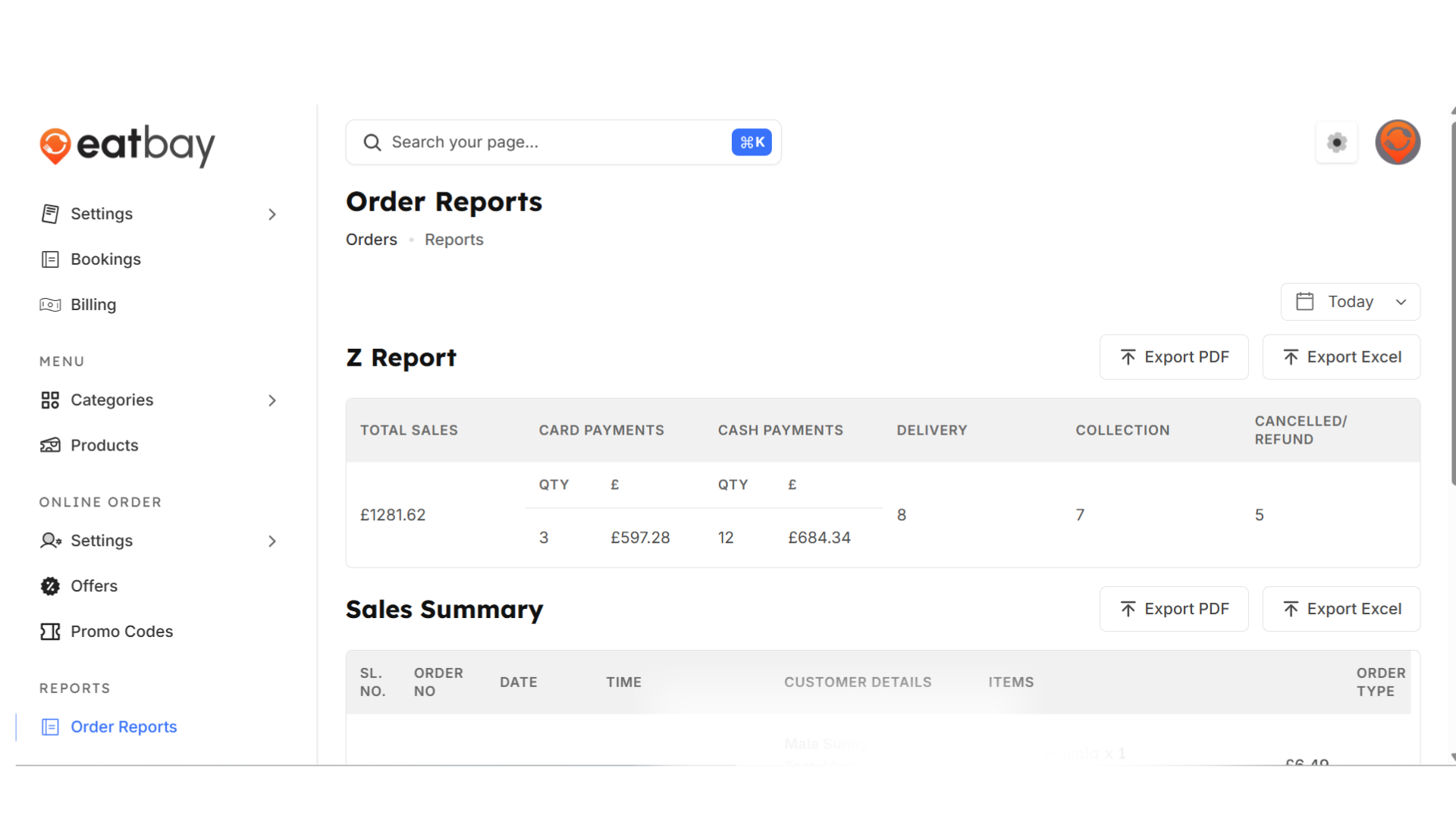
Order Reports
Q: What are Order Reports in EatBay?
A: Order Reports provide a detailed overview of all customer orders, including order no, date, items, order value, payment method, and order status. These reports help you track sales and performance.
Q: Where can I find Order Reports in the dashboard?
A: Go to Dashboard → Reports → Order Reports to view all your restaurant’s orders.
Q: Can I filter orders by date or status?
A: Yes. You can filter only by date/month in this page, order status (Completed, Pending, Cancelled), and payment type for better analysis.
Q: Can I download or export Order Reports?
A: Yes. Order Reports can be exported for accounting, reconciliation, or business analysis purposes.
Q: Are cancelled or failed orders included in reports?
A: Yes. All orders, including completed, cancelled, and failed transactions, are available in Order Reports for full transparency.
Q: How often are Order Reports updated?
A: Order Reports are updated in real time as customers place or update their orders.
Q: Do Order Reports affect customer-facing data?
A: No. Order Reports are for internal use only and do not impact what customers see on the website or app.