
Categories
Contact sales
Learn more about our solutions and services.
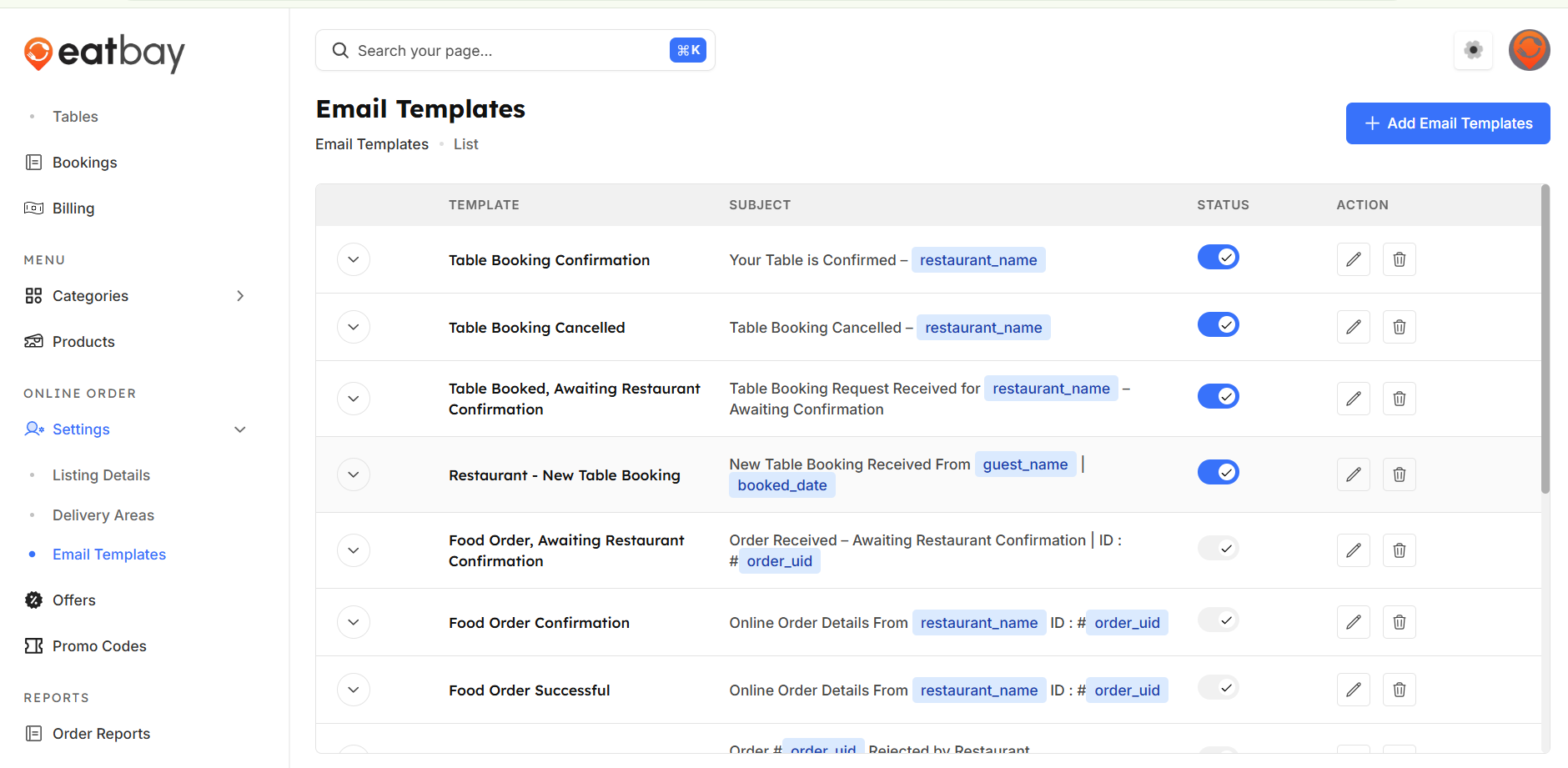
Email Templates
Q: What are Email Templates in EatBay?
A: Email Templates are predefined messages used to automatically send order updates, booking confirmations, cancellations, and other notifications to customers.
Q: How can I access email templates?
A:Go to Dashboard →online order settings→ Email Templates, To view the email templates.
Q: Can I edit email template content?
A: Yes. You can customize the subject line and message content of each email template to match your restaurant’s branding and communication style.
Q: What types of email templates are available?
A: Templates include Food Order, Awaiting Restaurant Confirmation, Food order Successful, Food Order Rejection, Food Order Cancellation, Food Order Completed, Food Order Failed, Table Booking Confirmation, Restaurant-new table booking, Restaurant-table booking rescheduled, Table Booking Reschedule Confirmation.
Q: Can I enable or disable specific email templates?
A: Yes. You can enable or disable individual templates depending on which notifications you want to send to customers.
Q: Will changes apply immediately?
A: Yes. You must click Save / Publish for changes to email templates to take effect.
Q: Are emails sent automatically to customers?
A: Yes. Once enabled, email templates are triggered automatically based on order or booking activity.